For developers
A Mac cleaner for developers
Atzu Safe Data Cleaner finds what development tools leave behind — Xcode build output and simulators, package caches, project dependencies and AI coding tool data — and rates each one for what clearing it costs, before anything is deleted.
It was built on a developer's Mac, by a developer whose disk kept filling up with build output, caches and simulators. Much of what it checks exists because of development tools, and every one of those is listed below.
One real scan, and what clearing each row costs
The app's own report, run on the Mac it is built on at 23:33 on 29 October 2026 (Atzu Safe Data Cleaner 1.2y), developer categories only. Nothing was deleted to make it. Your Mac will hold different amounts, and Atzu Safe Data Cleaner does not promise any.
- Xcode Derived Data514.3 MBThe next build of each project starts from scratch and Xcode indexes it again. Nothing to download.
- Codex Updater Cache1.91 GBDownloaded Codex app updates. Codex downloads the current one again at its next update check.
- Project Build Folders18.68 GBnode_modules, Pods and .dart_tool in 31 places. npm install, pod install or flutter pub get brings each back, over the network, before that project builds again.
- Simulator Runtimes8.49 GBOne iOS runtime. If a project still targets that version, Xcode downloads all of it again; the app says whether your Xcode still uses it.
- Xcode Simulators4.54 GBThe apps and data inside one simulated device. Xcode makes a fresh device; what was installed in it does not come back.
- Simulator Shared Cache3.26 GBmacOS makes it again the next time a simulator boots, which is slower that once. Owned by the system, so it asks for your password.
- Android SDK Extras2.98 GBAndroid Studio's SDK Manager downloads the NDK, system images or emulator again when a project needs them.
- Python User Packages1.55 GBpip install --user puts them back. They go to the Trash, not straight off the disk.
- Old Codex Project Checkouts6.52 GBDated copies of projects from past sessions, 53 of them. Check for work that is not committed anywhere else.
- Codex Sessions & Plugins3.15 GBYour Codex history. Not a cache: nothing regenerates it.
- Xcode Archives435.6 MBSix shipped builds and the symbols that read their crash reports. Nothing can make them again.
Empty on this Mac that evening: NPM Cache, Homebrew Downloads, iOS Device Support, SwiftUI Previews, Claude Code Build Folders, Codex Runtimes.
See your own Mac's numbers: the yearly plan starts with 7 days free.

The Mac App Store edition covers Xcode Derived Data, iOS Device Support, SwiftUI Previews, Xcode Archives and a few package caches. Simulators, project folders and AI coding tools are outside its sandbox.
What it finds
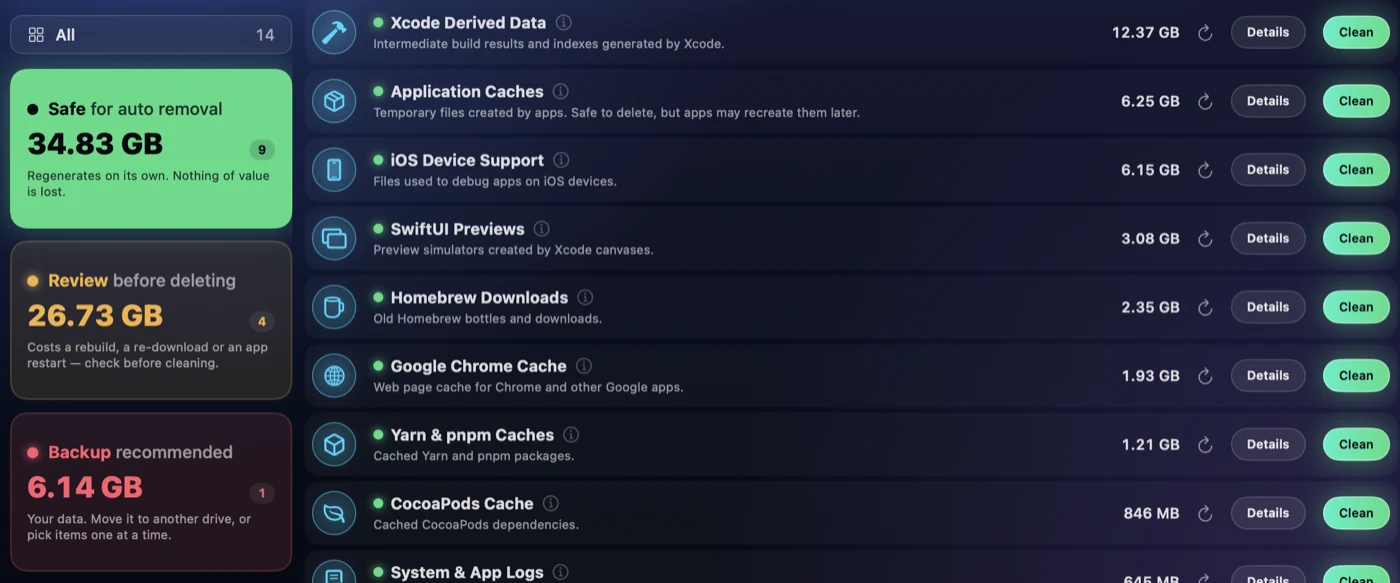
Each is its own row, sized separately and given one of the four safety levels — which decides what the Clean button is allowed to do with it.
Xcode and the simulators
- Xcode Derived DataSafe for auto removalBuild output and indexes, one folder per project
- iOS Device SupportSafe for auto removalSymbols copied from every device you have connected
- iPhone Support CachesSafe for auto removalCoreDevice caches from installing and debugging on a phone
- SwiftUI PreviewsSafe for auto removalSimulators made for Xcode's canvas
- Xcode SimulatorsReview before deletingEach simulated device, with its apps and data
- Simulator RuntimesReview before deletingOne per iOS or watchOS version, each saying whether your Xcode still uses it
- Simulator Shared CacheReview before deletingOwned by the system, so macOS asks for your password
- Xcode ArchivesBackup recommendedDistributed builds, and the symbols that read their crash reports
- Installers & System ImagesReview before deletingXcode downloads, iPhone and iPad restore images and macOS installers, each named with its version
Package managers
- NPM CacheSafe for auto removalnpm's download cache and npx installs
- Yarn & pnpm CachesSafe for auto removalTheir caches and the pnpm store
- CocoaPods CacheSafe for auto removalDownloaded pods
- Gradle CachesSafe for auto removalDependencies, build outputs and downloaded Gradle versions
- Homebrew DownloadsSafe for auto removalOld bottles and downloads, after brew cleanup --prune=all
- Python User PackagesReview before deletingInstalled with pip --user; moved to the Trash
Your projects
- Project Build OutputSafe for auto removalbuild, .build, .next, dist and target folders in projects you haven't built lately
- Project Build FoldersReview before deletingnode_modules, Pods and .dart_tool, plus build folders in projects you are working on
Android
- Android EmulatorsReview before deletingEach emulator's disk image
- Android SDK ExtrasReview before deletingThe NDK, system images and the emulator
AI coding tools
- Claude Code Build FoldersSafe for auto removalXcode build trees Claude Code sessions leave behind
- Codex Updater CacheSafe for auto removalDownloaded Codex updates
- Codex RuntimesSafe for auto removalRuntimes Codex downloads to run code
- Claude Code ScratchpadsReview before deletingWhat earlier sessions left in /private/tmp
- Claude Desktop Builds & UpdatesReview before deletingSimulator builds and downloaded updates of the Claude app
- Codex Sessions & PluginsBackup recommendedYour Codex history: not a cache
- Old Codex Project CheckoutsBackup recommendedDated copies of projects from past sessions
Built around how developers work
- A build tree is never deleted under a running tool. A scheduled clean skips the Xcode categories while Xcode is open, and the Codex ones while Codex is, and says so in its history. Claude Code's build folders are never cleaned on a schedule at all, because the app cannot tell whether a session in Terminal is mid-build.
- Every project build folder says how to get it back —
npm install,pod install,flutter pub get,cargo build— on its own row, before you clean it. - Symlinks are never followed, so a dependency folder that points at an external drive is neither counted nor deleted.
- No byte is counted twice. Where one category sits inside another — Claude Code's build folders inside its scratchpads, say — the inner one is taken out of the outer one's size.
- Running Now lists the simulators left booted and the log watchers tools started and forgot, with what each is costing in CPU and memory, and shuts down or stops the ones you pick. Those are the usual reason a developer's fan will not stop.
Most of it comes back
Build output and package caches regenerate by design, so clearing them is maintenance rather than a one-off. On the Mac this app was built on, three weeks after a clean, what had built up again by 1 October 2026 included 7.9 GB in one simulator runtime (iOS 26.5), 5.66 GB of simulators, 1.56 GB of Codex runtimes and 0.67 GB of DerivedData — one Mac on one day, not a promise about yours. A scheduled clean of the Safe for auto removal categories keeps the regrowth from mounting up.
If you would rather stay in the terminal, Mole is a free, open-source cleaner that covers much of the same ground, with a --dry-run preview on every command that deletes. Here is when each one fits.
Guides
- Where Xcode DerivedData lives, and whether it is safe to delete
- How to clear Xcode DerivedData, three ways
- Removing old simulator runtimes
- Finding and deleting node_modules
- Cleaning the Homebrew cache
- What AI coding tools leave on your Mac
- How to uninstall Docker Desktop, and what goes with it
- How to uninstall Anaconda, and what goes with it
- How to uninstall VMware Fusion, and why your virtual machines stay
- How to uninstall Parallels Desktop, and where its virtual machines are
- How to uninstall Xcode, and what it leaves in ~/Library/Developer
- What fills up a developer's Mac, tool by tool
What to do next: see these numbers for your own Mac. Download Atzu Safe Data Cleaner free, or get it on the Mac App Store.
What it costs to have an app do this
| Atzu Safe Data Cleaner | CleanMyMac | MacKeeper | |
|---|---|---|---|
| Pay once | $24.99 | €119.95 on MacPaw’s store; $89.99 for CleanMyMac X on the Mac App Store | subscription only |
| Yearly | $14.99 a year, first 7 days free | $39.99/yr on the Mac App Store; €39.95/yr on MacPaw’s store | €71.40 for the first year, 1 Mac. Their page shows it against a €119.40 list price |
| Monthly | $1.99 a month | $9.99/mo | €10.95/mo |
| Account needed | No | Yes | Yes |
Both versions' yearly plans start with 7 days free. CleanMyMac and MacKeeper prices read from their own pages and the Mac App Store on 27 October 2026; the full comparison is at Atzu Safe Data Cleaner vs CleanMyMac and MacKeeper.
Frequently asked questions
What takes up space on a developer’s Mac?
Xcode build output and indexes, simulators and their runtimes, package caches for npm, Yarn, pnpm, CocoaPods, Gradle and Homebrew, project folders such as node_modules and Pods, Android emulators and SDK extras, and the build trees and runtimes AI coding tools leave behind.
Should I delete old Xcode archives?
Treat them as your data rather than as cache. Xcode Archives hold your distributed builds and the symbols that read their crash reports, which is why they are rated Backup recommended rather than Safe for auto removal like DerivedData and package caches.
Does developer build output come back after clearing it?
Build output and package caches regenerate by design, so clearing them is maintenance rather than a one-off. On the Mac this page was written on, three weeks after a clean, one simulator runtime held 7.9 GB again, the simulators 5.66 GB and DerivedData 0.67 GB.
Will Atzu Safe Data Cleaner delete a build folder while Xcode is running?
No. A scheduled clean skips the Xcode categories while Xcode is open and the Codex ones while Codex is, and says so in its history. Claude Code’s build folders are never cleaned on a schedule at all, because the app cannot tell whether a session in Terminal is mid-build.