
Blog · Memory
Is Claude Code using your Mac's memory? How to see each session
Each Claude Code session is its own set of processes, and a session that has run for hours or days can hold hundreds of megabytes. Activity Monitor lists them without saying which project each belongs to. RefreshYourMac's Memory sheet lists every session started from the Claude app by project, age and size; run /compact in a big one, or end it and start a new one, to release what it has built up.
If you work with Claude Code, you probably leave sessions open: one per project, a worktree for a side task, one you started yesterday and meant to come back to. Each one is its own set of processes, and a session that has been running for hours keeps hold of what it has built up. Six of them can quietly add up to a gigabyte or more.
Why Activity Monitor doesn’t help much
Open Activity Monitor and sort by memory, and you will find several processes that all look the same. There is nothing in the list to say which project each belongs to, how long it has been running, or which of the helper processes beneath it are part of the same session. Quitting the wrong one ends a conversation you were still using.
What RefreshYourMac shows
Click the Memory tile in RefreshYourMac and the What is using memory sheet lists the apps holding memory, then a Claude Code sessions section:
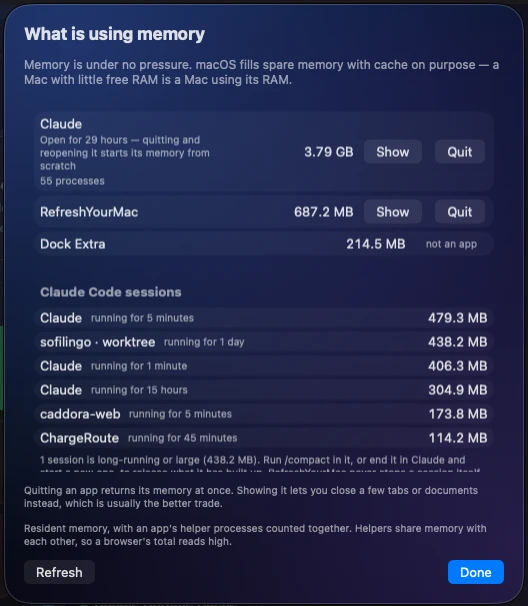
- One row per session, named by its project folder, with every helper process counted in.
- How long it has run, so the one you forgot about since yesterday stands out.
- What it holds, largest first.
- Clear names for the awkward ones. A session in a git worktree reads “sofilingo · worktree” rather than the random folder name Claude gave it, and one started without a project says so.
Once a session has run for a day, or holds more than 500 MB, the sheet says so under the list.
The sessions it lists are the ones started from the Claude desktop app. RefreshYourMac never stops a session itself: a session is a conversation, and only you know whether you still need it.
What to do about a big session
- Run
/compactin it. Claude Code summarises the conversation so far and carries on from the summary, so what the session carries is far smaller than the whole history. - Or end it and start a new one. Ending a session releases everything it holds at once. This is the better choice for one you have finished with.
- Leave the rest alone. A small session from five minutes ago costs little, and memory macOS is not short of is not worth reclaiming. The sheet’s first line says whether your Mac is under memory pressure at all.
The conversation logs are a disk question, not a memory one
Claude Code also keeps every conversation as a log file in ~/.claude/projects, and never removes
them. Those take disk space and no memory. RefreshYourMac lists them as their own category,
Claude Code Session Logs, largest first, with the first thing you asked in each. Logs changed
in the last week are never listed, picked logs go to the Trash, and the category is never cleaned
automatically, because removing a log means you can no longer resume that conversation.
Fixed in 1.3.7
In 1.3.6, with several sessions running, the session list took the room the apps needed and the apps above it shrank to a single row. In 1.3.7 the apps and the sessions share one scrolling list, so both can always be seen. It updates on its own from the app, or comes with the download.
Try it
The Memory sheet is in the download edition of RefreshYourMac; the Mac App Store edition cannot read other apps’ processes. The 7-day free trial covers the rest of your Mac too.
What to do next: see these numbers for your own Mac. Download Atzu Safe Data Cleaner free, or get it on the Mac App Store.
What it costs to have an app do this
| Atzu Safe Data Cleaner | CleanMyMac | MacKeeper | |
|---|---|---|---|
| Pay once | $24.99 | €119.95 on MacPaw’s store; $89.99 for CleanMyMac X on the Mac App Store | subscription only |
| Yearly | $14.99 a year, first 7 days free | $39.99/yr on the Mac App Store; €39.95/yr on MacPaw’s store | €71.40 for the first year, 1 Mac. Their page shows it against a €119.40 list price |
| Monthly | $1.99 a month | $9.99/mo | €10.95/mo |
| Account needed | No | Yes | Yes |
Both versions' yearly plans start with 7 days free. CleanMyMac and MacKeeper prices read from their own pages and the Mac App Store on 27 October 2026; the full comparison is at Atzu Safe Data Cleaner vs CleanMyMac and MacKeeper.